How to Reserve Your WhatsApp Username: A Complete Step-by-Step Guide
For years, WhatsApp users have had to hand over their phone number to anyone they wanted to chat with — a coworker, a new client, a stranger in a group chat. That’s finally changing. WhatsApp has begun rolling out usernames, a privacy-first feature that lets people message each other without ever sharing a phone number, and the company has opened username reservations ahead of the full launch later this year.
If you want to lock in the name you actually want before someone else takes it — especially with over 3 billion people competing for the same handles — you’ll want to reserve it now. Here’s everything you need to know, broken down into a simple, step-by-step process.
What Is a WhatsApp Username — And Why Reserve One Now?
A WhatsApp username is a unique handle tied to your account that other people can use to find and message you instead of your phone number. Once the full feature launches, you’ll be able to share your username the same way you might share an Instagram or Telegram handle — without exposing the digits behind it.
The catch is timing. WhatsApp isn’t activating full username functionality for everyone just yet; it’s only opening the reservation window first. The company has said plainly that with billions of users on the platform, popular names and short handles are going to overlap fast. Reserving your username now means it’s locked in under your account before anyone else can grab it, even though you won’t be able to actively use it to receive messages until the feature fully rolls out in your country later this year.
In short: reservation is first-come, first-served, but usage comes later.
Before You Start: What You’ll Need
Before diving into the steps, make sure you’ve covered the basics:
- Update WhatsApp to the latest version on the App Store (iOS) or Google Play / Play Store (Android). The username tab won’t appear on outdated versions.
- An active WhatsApp account verified with your phone number — usernames don’t replace phone-based sign-up, they sit on top of it.
- A backup name idea or two, since common names, short handles, and anything resembling a celebrity, brand, or public figure’s name will likely already be reserved or blocked.
- Patience, if you’re an early reader of this guide. The rollout is gradual by region, so if you don’t see the option yet, it’s a matter of days or weeks, not a permanent block — WhatsApp will notify you in-app once it’s live on your account.
Step-by-Step: How to Reserve Your WhatsApp Username
Reserving a username takes less than a minute once the feature appears on your account. Here’s the exact process:
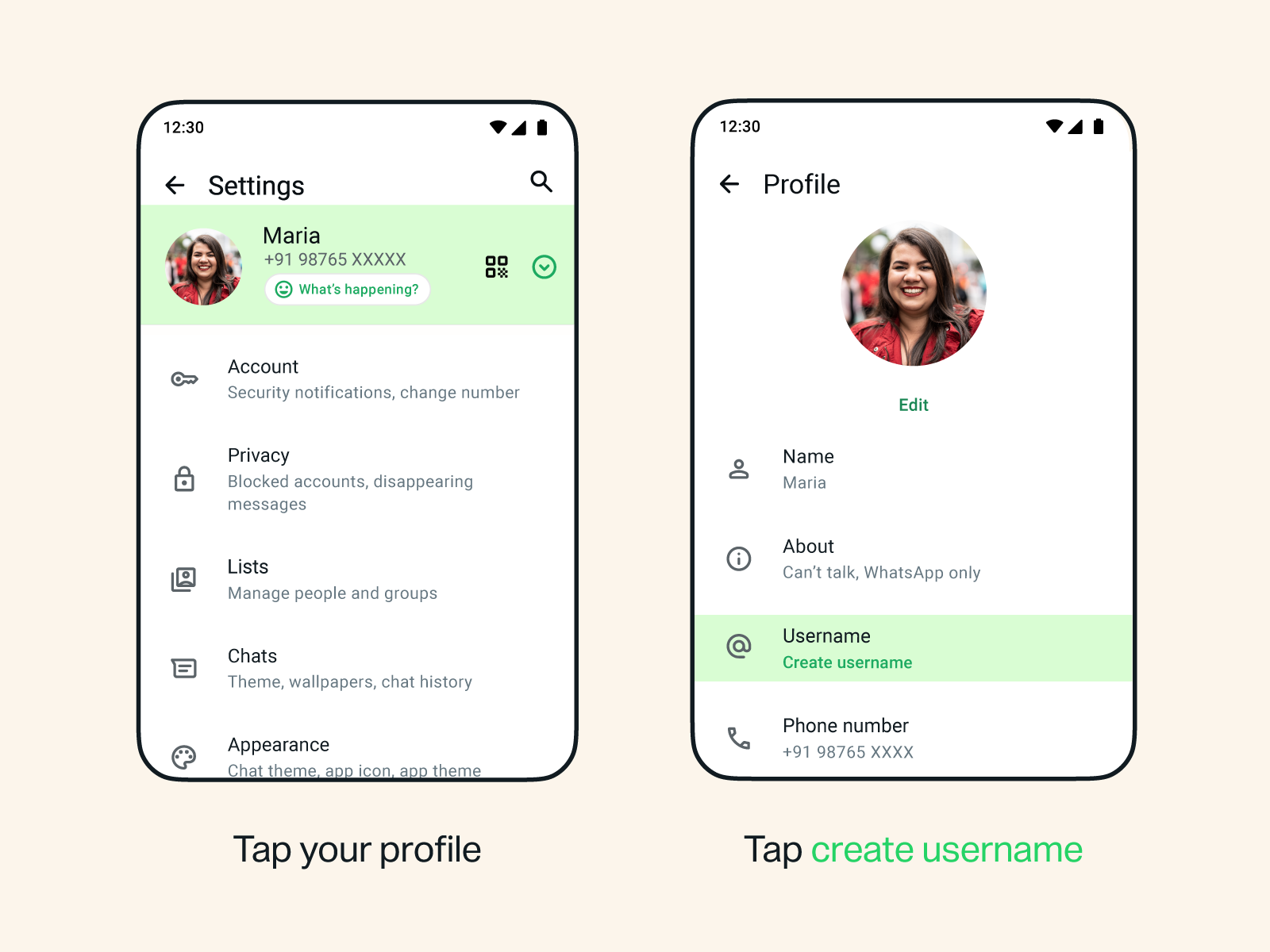
Step 1: Open WhatsApp Settings
Launch WhatsApp and tap on Settings (on iPhone, this is in the bottom-right tab bar; on Android, tap the three-dot menu in the top-right corner, then select Settings).
Step 2: Go to Account
Inside Settings, tap Account. This is the same section where you manage two-step verification, privacy controls, and your linked devices.
Step 3: Tap “Username”
You’ll see a new Username tab inside the Account menu. Tap it to open the username reservation screen. If this tab isn’t visible yet, it means the rollout hasn’t reached your account — check back after updating the app or wait for WhatsApp’s in-app notification.
Step 4: Enter Your Desired Username
Type in the handle you want. WhatsApp checks availability in real time as you type, so you’ll see instantly whether it’s free, taken, or restricted.
- Usernames must be between 3 and 35 characters.
- They generally support letters, numbers, and underscores or periods, similar to handle conventions on other platforms.
- Usernames tied to celebrities, politicians, brands, and other public figures have already been pre-reserved by WhatsApp and cannot be claimed by regular users, even if you share that name.
Step 5: Use the Suggestion Tool If Your First Choice Is Taken
If your preferred username is already gone, don’t worry — WhatsApp automatically generates a list of close alternatives based on what you typed. You can scroll through these suggestions and pick one, or keep adjusting your entry until you land on something available.
Step 6: Claim Your Instagram or Facebook Handle (Optional)
If you’re a creator, freelancer, or small business owner who wants consistent branding across platforms, WhatsApp has built in an option to claim a username matching your existing Instagram or Facebook handle, where available. This helps maintain a recognizable identity across Meta’s apps.
Step 7: Set Up a Username Key (Optional but Recommended)
Once you’ve chosen a username, WhatsApp offers an additional privacy layer called a username key — essentially a PIN-like code. Here’s why it matters: usernames are not searchable, and there’s no public directory, but if your username ever leaks or gets shared without your permission, a username key ensures strangers still can’t message you unless they also know that key. If privacy is your main reason for using this feature, it’s worth setting one up.
Step 8: Tap “Save,” Then “Done”
Confirm your choice by tapping Save, then Done to finalize the reservation. That’s it — your username is now reserved under your account.
What Happens After You Reserve a Username?
Reserving doesn’t mean people can message you using that handle immediately. Right now, this step simply locks in your name. The full feature — where your username actually becomes usable for receiving messages from new contacts — is rolling out gradually by country and will be available to everyone “later this year,” according to WhatsApp. You’ll get an in-app notification when it activates for your account.
It’s also worth noting an important privacy nuance: enabling a username only protects your number in new conversations. Any existing contacts or group chats that already have your phone number will continue to see it as before. The username feature doesn’t retroactively hide your number from people who already have it.
Can You Change Your WhatsApp Username Later?
Yes. If you reserve a username now and decide later you want something different, you can return to Settings > Account > Username and change it — as long as your new desired handle is still available. There’s no indication of a strict limit on how often you can switch, but treating your username like a stable handle (the way you would an email address) is the more practical approach, especially once people start using it to reach you.
WhatsApp Username Rules at a Glance
| Rule | Detail |
|---|---|
| Character length | 3 to 35 characters |
| Directory/search | None — no public lookup or partial-match search |
| Visibility | Only visible to people who already know your exact username |
| Reserved names | Celebrities, public figures, and organizations are pre-blocked |
| Platforms supported | WhatsApp (personal) and WhatsApp Business |
| Devices supported | Both iOS and Android |
| Extra security | Optional username key (PIN-style) |
Does This Work for WhatsApp Business Too?
Yes. WhatsApp has confirmed that both regular WhatsApp accounts and WhatsApp Business accounts get access to usernames. For businesses, this is particularly useful for customer service, marketing, and sales teams that want a clean, brandable handle customers can message instead of memorizing a long phone number.
Frequently Asked Questions
Is reserving a WhatsApp username free? Yes, reserving and using a username comes at no cost — it’s a built-in account feature, not a paid add-on.
Will people be able to search for my username? No. WhatsApp has deliberately left out a directory or search function. Someone must already know your exact username to start a conversation with you.
What if I don’t see the Username option in my Settings yet? The rollout is gradual by region. Make sure your app is fully updated, and watch for an in-app notification — WhatsApp will alert you directly once the feature reaches your account.
Can I keep my phone number completely private with a username? Only for new contacts. Anyone who already has your number — existing chats, saved contacts, group members — will still see it. The username feature protects you going forward, not retroactively.
What’s the username key for? It’s an optional secondary code that adds protection in case your username is shared or leaked publicly, preventing unknown people from messaging you even if they find your handle.
Final Thoughts
WhatsApp’s move toward usernames brings the app in line with privacy-focused competitors like Telegram and Signal, while still keeping phone-number verification as the backbone of account security. Because reservations are happening ahead of the full rollout, the smartest move is to claim your preferred handle today — before the name you want gets taken by one of WhatsApp’s billions of other users.
Open Settings, tap Account, tap Username, and reserve yours in under a minute.